Dynamo DB is a great database with last-decade’s per-partition read and write limitations. But don’t worry, there’s a pre-canned way to get around that.
How Dynamo tracks (and throttles) Usage
Dynamo uses b-trees to store data in a listable, queryable way.1 It is quick to find individual objects given their full ID and we can query blocks of contiguous information if we know the prefix - which Dynamo calls the Partition Key (PK). With every great partition key comes a slightly less great object identifier called a Sort Key (SK). The combination of PK:SK create a uniquely-identifiable record.
The selection of the PK is critical to ensure you get the behavior you want out of your object within Dynamo. Too specific of a PK and your application has to have extra logic to look through all the potential keys. Too broad and you quickly run into performance limitations. In a SQL database, the PK is a lot like the table the record is in. Changing that - and all of your business logic to match - can be a long and arduous process.
Consider that you’re a greenfield identity company and you want to define your User object. What do you want to pick for the PK and SK? You may notice as a user of many websites yourself, you nearly always have a login that stores some information about you - be that your username, email, etc. That means it sits fairly “top level” architecturally. So you pick what seems the most sane at the time - the PK is your Tenant (Customer) ID, and the SK is the User ID. This makes sense, Users are scoped to the Tenant environment and nothing more. In C1’s codebase that looks like this:
message User {
    string tenant_id = 1;
    string id = 2;

    option (dynamo.v1.msg).key = {
        pk_fields: ["tenant_id"]
        sk_fields: ["id"]
    };
    // ...
}
If your user has a tenant of abc and an id of 123
u := User{TenantId: "abc", Id: "123"}then your PK/SK looks like
PK: user.v1.User:abc
SK: 123
A note on PK uniqueness
All objects are prefixed with their package name so that the PK is unique even if another object has the
tenant_idas the lone PK component.
You may notice I defined the object as a Protocol Buffer. Internally at C1, all data is defined this way. This enables us to write awesome tools like our CTO Paul Querna’s project protoc-gen-dynamo. It powers the translation from Dynamo to Go and back. The beautiful thing about this setup is that impactful decisions can be implemented incredibly quickly. Choosing the PK took one short moment to write. Five years later: two months of implementation and migration to improve. Once that’s done, we create the annotations, run the generation command, and voilà, you’re off to the races. 2
Databases have Layers
Now that we understand Dynamo’s core record model, it’s time to drop the hammer. Everything costs money and has limits. Shocking, I know. In Dynamo we deal with these (both in cost and performance) in the terms RCUs and WCUs for Read Capacity Unit and Write Capacity Unit respectively. 3 There could be a whole second blog post about how to calculate the usage and cost of these but for now we’ll focus on performance. For every partition in Dynamo, the speed is limited to 3000 RCUs or 1000 WCUs. This is great, 3000 per second is, like, 180,000 a minute, bro.
There’s effectively two reasons why this still isn’t sufficient.
- Colocation
- Data size
Internally, Dynamo performs a bucketing procedure for unique PKs. There may be anywhere from thousands to tens of thousands of unique PKs, but Dynamo doesn’t allocate unique partitions to each one of them. PKs can be colocated, which means that my PK of user.v1.User:abc might live in the same partition as another customer’s user.v1.User:def. And remember, the rate limits are per partition not partition key. If your two largest partition keys happen to land on the same partition, you’re out of luck.
The other thing I left out of my prior description is that RCUs and WCUs aren’t counted by number of records, they’re counted by the size of the data. An RCU is measured to be an item up to 4KB. If your item is 5, or 8, reading it takes 2 RCUs. If your item is 400KB (the maximum allowed size), that single item takes 100 RCUs. A WCU is only 1KB, so writing that data is not only 1/3rd the limit, but 1/4th the size. For large items that’s effectively 1/12th the speed.
At C1, we have a data pipeline responsible for managing the identity data of all of our customers. We map emails, managers, departments, and whatever configuration our customers provide (you can even do cross-app mappings). That means we’re loading all the users and writing the modified ones fairly frequently. Get unlucky about a few customers partitions, and suddenly we’re going much, much slower than what we’d want.
The largest scale test I’ve performed was for over a million users. Even at our maximum rate of 1000 WCUs per second, it’s at minimum 16 minutes to write all that data. Obviously in a world where any partition key can trample any other read we ratelimit well below this number. This is precisely why we have to go faster. At a table level, the scale of Dynamo’s defaults are much better; 40k RCUs and WCUs. Not to mention the docs about table-level capacity has this lovely note saying:
You can request any number of read capacity units (RCU) or write capacity units (WCU) for your DynamoDB tables… 4
So it’s 40k, but it can be increased. For now though let’s focus on unlocking that 40k number for our users object. Hopefully you’re with me when I say: it’s time to increase the cardinality of our Partition Keys. If you’re still not convinced maybe this AWS Developer Guide Page will put you over the line. The first sentence of that doc is my absolute favorite:
One way to better distribute writes across a partition key space in Amazon DynamoDB is to expand the space.
It’s so straightforward. So simple. If too small make bigger. I love it.
Expanding our Universe
For this feature we had a few main goals:
- Configuring the shard count should be a proto annotation
- The shard number should be derived solely from the PK/SK
- The shard number should not be stored on the object itself
- Developers at C1 shouldn’t have to know if an object is sharded to interact with it in code
- This mostly came true with some caveats I will explain later
Since this is not a post on code generation I’ll talk about the key changes and underlying algorithm added to protoc-gen-dynamo and not necessarily the code added to the generator specifically. It is open source, so you can read through the pull requests here. 56 Running the UserObject we defined before through protoc-gen-dynamo produces the following output:
func (p *User) PartitionKey() string {
    var sb strings.Builder
    sb.Reset()
    _, _ = sb.WriteString("user.v1.User:")
    _, _ = sb.WriteString(p.GetTenantId())
    return sb.String()
}
func (p *User) SortKey() string {
    return p.GetId()
}
As we mentioned previously, the PK defines the cardinality of what we put in Dynamo. For users on a tenant, this is pretty broad. To expand our world to fit this broad horizon, we have to expand our PK space. The AWS doc suggests two main strategies.
- Generate a random shard number for the object and append that to the end of the PK like
PK.1,PK.2. - Generate a calculated suffix based on the object’s PK/SK data.
The usage pattern examples they give talk about putting objects in Dynamo based on the date they were created. This may work fine if you’re trying to record all transactions during a specific day but for us, these records live as long as the user still exists, so we’re going to need retrieval without having to scan the entire table. For that reason alone we opted for the second suggestion - calculated suffixes.
Using Calculated Shards
With the changes made to protoc-gen-dynamo, we can define an object as “sharded” by adding a simple annotation. That would look like this:
message User {
    string tenant_id = 1;
    string id = 2;

    option (dynamo.v1.msg).key = {
        pk_fields: ["tenant_id"]
        sk_fields: ["id"]
+       shard: {
+           enabled: true
+           shard_count: 16 // must be a power of 2
+       }
    };
    // ...
}
That’s the entire diff. That’s all it takes. Your object is now split into 16 shards.
Danger
Remember, partition keys define the partition these objects live in. If you add a shard to your PK without doing a migration your existing code will fail to read any data. The base PK and the PK ending with a shard number are distinctly different records.
We do this by constructing the full PK:SK of the object, running xxhash 7 against the full string, and then taking the lowest log2(shard_count) bits to get our shard. To get those bits you just have to bitwise AND the hash with shard_count-1.
A note about modulo bias
The reason we use the bitwise
&is to avoid modulo bias. Astute readers may know that using a denominator that is a power of two also gets around modulo bias. However, bitwise&is theoretically faster not to mention just a bit simpler. It really does not matter if theshardIdis mathematically related to the input, we just want a uniform distribution of shards.
With sharding enabled and our shard count configured, protoc-gen-dynamo will instead generate a PartitionKey function that looks like this:
func (p *User) PartitionKey() string {
    var sb strings.Builder
    sb.Reset()

    // Construct the PK:SK
    _, _ = sb.WriteString("user.v1.User:")
    // panic (or error) if sort key is empty, we need that for the shard!
    _, _ = sb.WriteString(p.GetTenantId())
    _, _ = sb.WriteString(":")
    _, _ = sb.WriteString(p.GetId())
    pkskStr := sb.String()
    //pkskStr now equals `user.v1.User:abc:123`
    hashValue := xxhash.Sum64String(pkskStr)
    shardId := hashValue & 15 // shard_count - 1
    sb.Reset()
    //shardId now equals 0b1011, so, the 11th shard!

    // Now that we know the shard, we need to create the partition key
    _, _ = sb.WriteString("user.v1.User:")
    _, _ = sb.WriteString(p.GetTenantId())
    _, _ = sb.WriteString(":")
    _, _ = sb.WriteString(strconv.FormatUint(uint64(shardId), 10))
    // and at the end, the PartitionKey is `user.v1.User:abc:11`
    return sb.String()
}
You can try it yourself here: https://go.dev/play/p/tITdB0LcrDU
Using the code above, our PartitionKey has been generated, and a shard appended to the end. This example of user.v1.User:abc:123 generates a shard number of 11, so the PK is user.v1.User:abc:11 and the SK is 123, but if you want to see some more shard counts I generated a list of these from 0 to 15:
More shard numbers
user.v1.User:abc:0:   12
user.v1.User:abc:1:   14
user.v1.User:abc:2:   13
user.v1.User:abc:3:   6
user.v1.User:abc:4:   6
user.v1.User:abc:5:   5
user.v1.User:abc:6:   12
user.v1.User:abc:7:   11
user.v1.User:abc:8:   13
user.v1.User:abc:9:   5
user.v1.User:abc:10:  12
user.v1.User:abc:11:  15
user.v1.User:abc:12:  13
user.v1.User:abc:13:  5
user.v1.User:abc:14:  14
user.v1.User:abc:15:  14
And in larger numbers, the distribution looks like this:
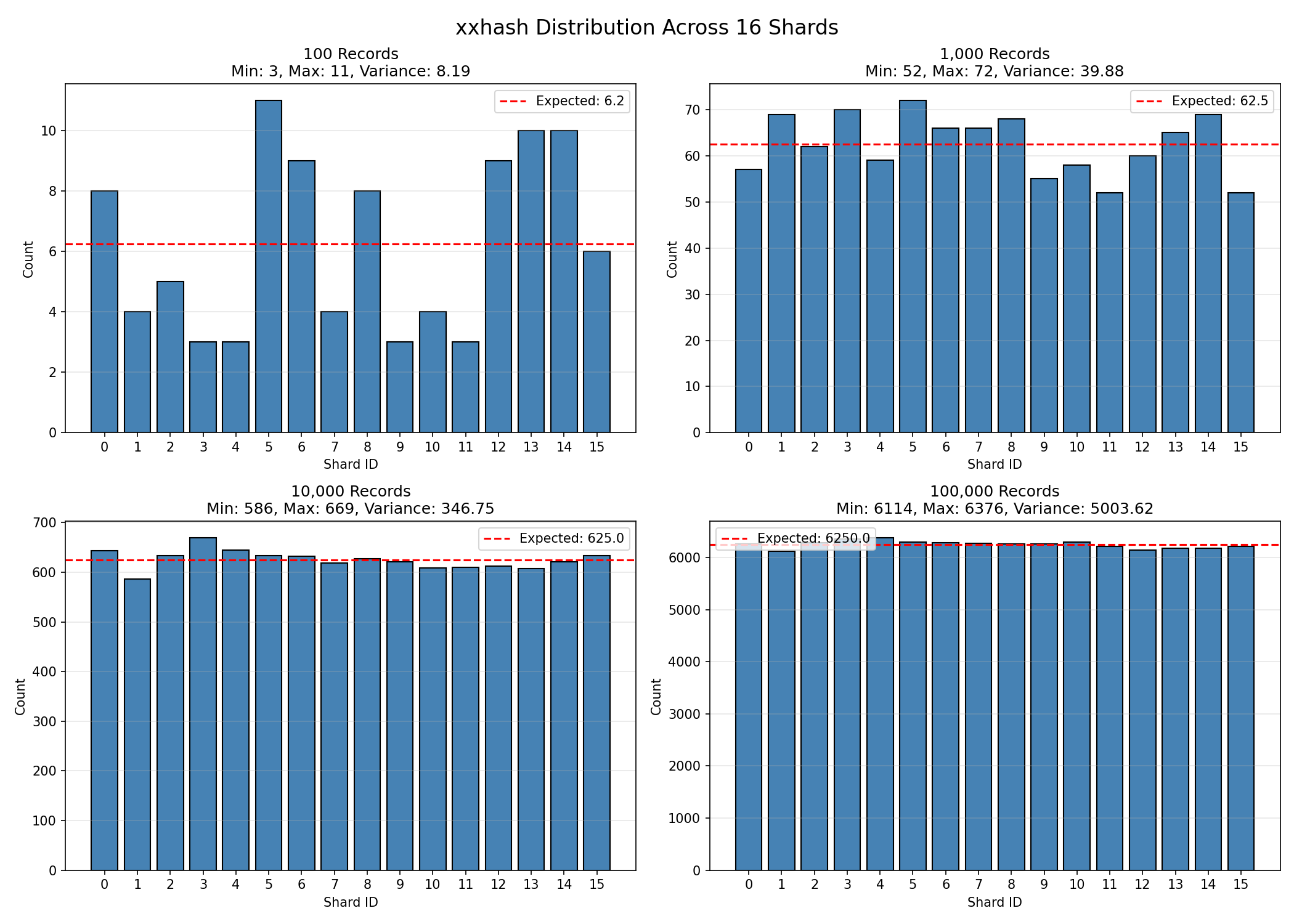
And with that, we’ve accomplished the first three of our four goals
- Configuring the shard count should be a proto annotation
- The shard number should be derived solely from the PK/SK
- The shard number should not be stored on the object itself
- Developers at C1 shouldn’t have to know if an object is sharded to interact with it in code
Reading the Expanded Space
You’ll notice I left one task incomplete from my list of desired features. Unfortunately, you can’t fundamentally change the way your data is stored without fundamentally changing how it’s accessed. Given some records in a database, there’s really only a few universal operations you’d want to do on them. For Dynamo, that basically boils down to:
- GET record
- PUT record
- DELETE record
- QUERY records
For GET, PUT, and DELETE, these sharded objects work identically. Each of these operations have to uniquely identify the record which gives us everything we need to generate the valid shard. For QUERY, however, life has to change. One last detail that’s important to note is that Dynamo will return objects in lexicographic (think: dictionary) order within a single partition. This compounds with the fact that, at C1, the IDs of our objects are also lexicographically ordered by time.8 In an unsharded world you can simply query the Users list and get them back in-order. Once you introduce sharding this goes out the window. Consider the users:
// Leaving TenantId blank for simplicity
u1 := User{Id: "a"}
u2 := User{Id: "b"}
u3 := User{Id: "c"}
With no partition, you always get back a before b before c. Now, let’s assign them shards. Running through our algorithm, the shards turn out like this:
a:12
b:15
c:14
So, if we just query in order of the shards we get, a then c, then b. We’ve lost our in-order constraint. For most use-cases this is not that important but five years of building later and it’s an accepted and expected caveat of our system. You can’t simply remove that “feature” of the data layer without causing headaches and confusion. Before sharded objects, there was only one way for our engineers to query records. After, we have three choices.
Shard-Ordered Reads
This is pretty simple. We have protoc-gen-dynamo generate a function that returns a static number.
func (p *User) GetShardCount() uint32 {
    return 16
}
Then, the algorithm for reading is straightforward.
allUsers := []*user.User{}
for shardID := 0; shardID < u.GetShardCount(); shardID++ {
    allUsers = append(allUsers, getUsersFromShard(shardID))
}
return allUsers
This one, though, doesn’t actually exist in our codebase. Like I said before: You can’t simply remove that “feature” of the data layer without causing headaches and confusion.
Parallel Shard Reads
This one is mildly more complicated from a code perspective, but essentially the same result as the shard-ordered read. You could load from every shard at once but in order to balance performance with DB load we opted for something slightly more tame. Despite the fact that user.v1.User:abc:1 and user.v1.User:abc:2 are very similar textually, Dynamo does not try to group “similar” PartitionKeys onto nearby partitions in any particular way. This means we can chunk out our reads to a smaller pool of workers to read in parallel. Consider the situation where we have 16 shards and 4 workers. Each worker gets 4 shards to read from. Our algorithm pseudocode looks something like this.
allUsers := []*user.User{}
shardCountBlocks := getBlocksOfShards(u.GetShardCount())
// shardCountBlocks = [[0,1,2,3], [4,5,6,7], [8,9,10,11], [12,13,14,15]]
for block := range shardCountBlocks {
    go func() {
        thisData := []*user.User{}
        for shardID := range block {
            thisData = append(thisData, getUsersFromShard(shardID))
        }
        merge(allUsers, thisData)
    }
}
// wait for goroutines
return allUsers
In our codebase, since this function reads as hard as we can, we’ve limited this to exclusively scanning our the entire list of users which happens primarily in our ETL pipeline. It’s also convenient that we restrict this to loading ALL users because we can sort them by timestamps in memory as needed.
High-Watermark Reads
A viable but difficult to implement strategy:
The goal of this algorithm is to provide a balance of memory use, database reads, and shard fairness, while also maintaining that our records will be returned in lexicographic order. This tries to fulfill the fourth goal of the original implementation “Developers at C1 shouldn’t have to know if an object is sharded to interact with it in code”. This is a very high-level description of the algorithm:
- Read one page worth of data from each shard
- Do this until you have at least one page worth of data from all of your shards
- Pick the last item from all of the loaded data, this record is your high water mark (hwm)
- For each shard that isn’t your hwm, load data until you get a page token that is lexicographically after your hwm.
- If Dynamo returns an empty paging key, you’ve read to the end of the shard
- Remember, each shard is independently ordered. If you have loaded
Cfrom shard10andDfrom shard5, nothing in shard5will come before the values in shard10. Therefore, ifCis your hwm, and you readD, you can just stop reading from shard10.- Truncate your list of data for each shard to the last object that falls before your hwm.
- Once all shards are done being read from, merge all the records into one list and sort them by… the sort key. This achieves the goal that internal development can mostly make the same assumptions. There’s lots of deficiencies in this, the full breadth of which I may explore in a future post but for now this is where I’ll leave us. If you’re read this and thought I must be out of my mind - you’re probably right.
Round-Robin Ordered Reads
This is what we settled on at ConductorOne. It’s strikes a balance between order and read fairness. The first strategy we tried (in the warning block below) ended up having some problems. It was very difficult to reason about the code, to be certain about order you had to overscan a minimum of shard_count * page_size, and in worst-case scenarios you still could be limited by the maximum speed of a single shard. It violated one of the biggest axioms of software engineering: overly clever solutions are impossibly complex to debug. After some wrestling with this implementation we decided to ditch it in favor of Round-Robin Ordered Reads. This algorithm is simple:
- Load the 0th page of the 0th shard. If we filled our requested page size, return.
- Load the 0th page of the 1st shard. If we filled…
- Load the 0th page of the 2nd-Nth shard. Once we’ve reached the final shard, loop back around to the 1st page of the 0th shard, and repeat. The loop might look something like this:
results := []*user.User{}
shardPages := []int{}
for shardsNotExhausted {
	for shardNum := 0; shardNum < shardMaxCount; shardNum++ {
		onePage := loadNextPageFromShard(shardNum, shardPages[shardNum])
		results = append(results, onePage)
	}
}
So, the returned value from the graph of users at 64 shards looks like this: 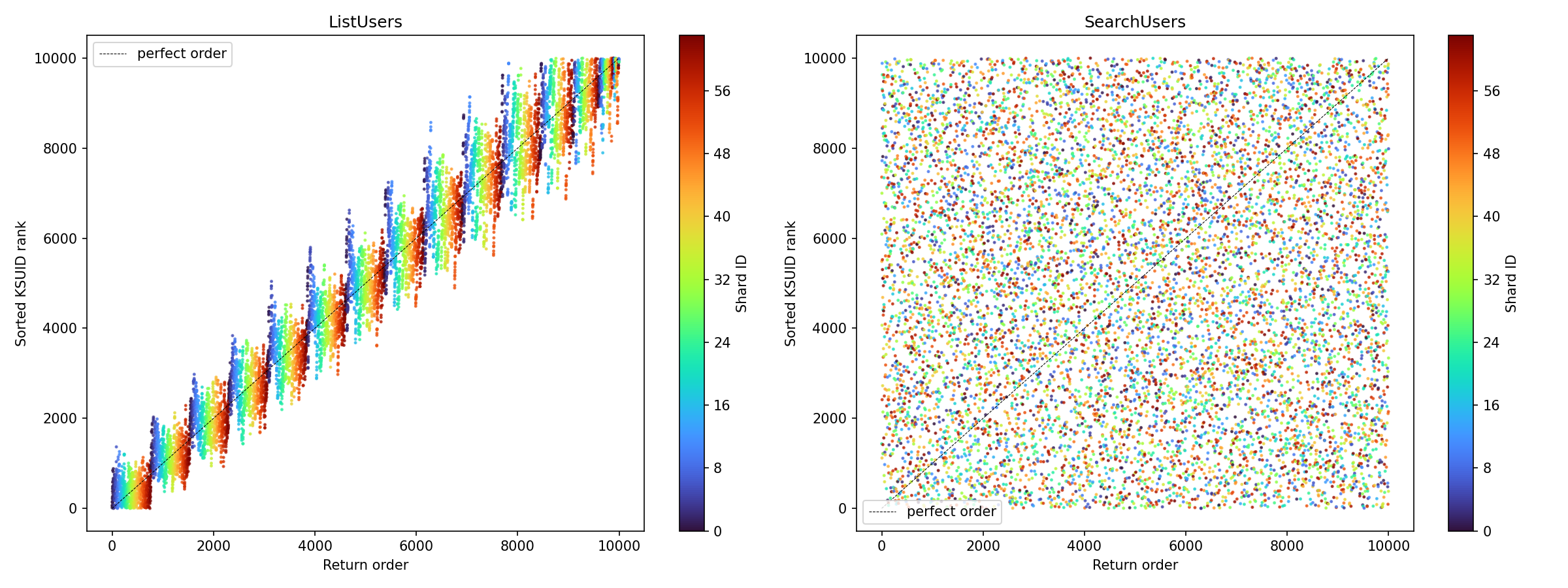
On the X-Axis, the true sort order of the record returned. On the Y access, the actual sort order returned. The color of the rainbow represents what shard it comes from. The right side of the image is the order that Postgres returns the data in without an order by query. While we were driving for the absolute order to be the same, at some point a decision was made that moving to this strategy was an acceptable change in behavior. Anything that’s scanning the whole database doesn’t care about order, it can sort in memory if it needs to. Plus, the absolute order in the database is only really keyed off of when it was added to the database in the first place. Not super valuable information for anyone really.
We didn’t exactly achieve our perfect order solution. We have an option for it, but the risks are too great. Plus we got to optimize for what we really wanted to, which is maximum shard-scanning fairness.
Footnotes
-
protoc-gen-dynamo: getting the anonymous exported functions right ↩
-
To the precision of one second, so it’s not perfect but it’s good enough: https://github.com/segmentio/ksuid ↩